Improve drag and drop UI for behavioral assessments
Bug fixes
Outlook Sim 2021: Font doesn't change
Broken layout on results page
Broken layout in Quiz for free response with video
1 Feature and Improvement Spotlight
1.1 Linea Build (AI-assisted Assessment Creation)
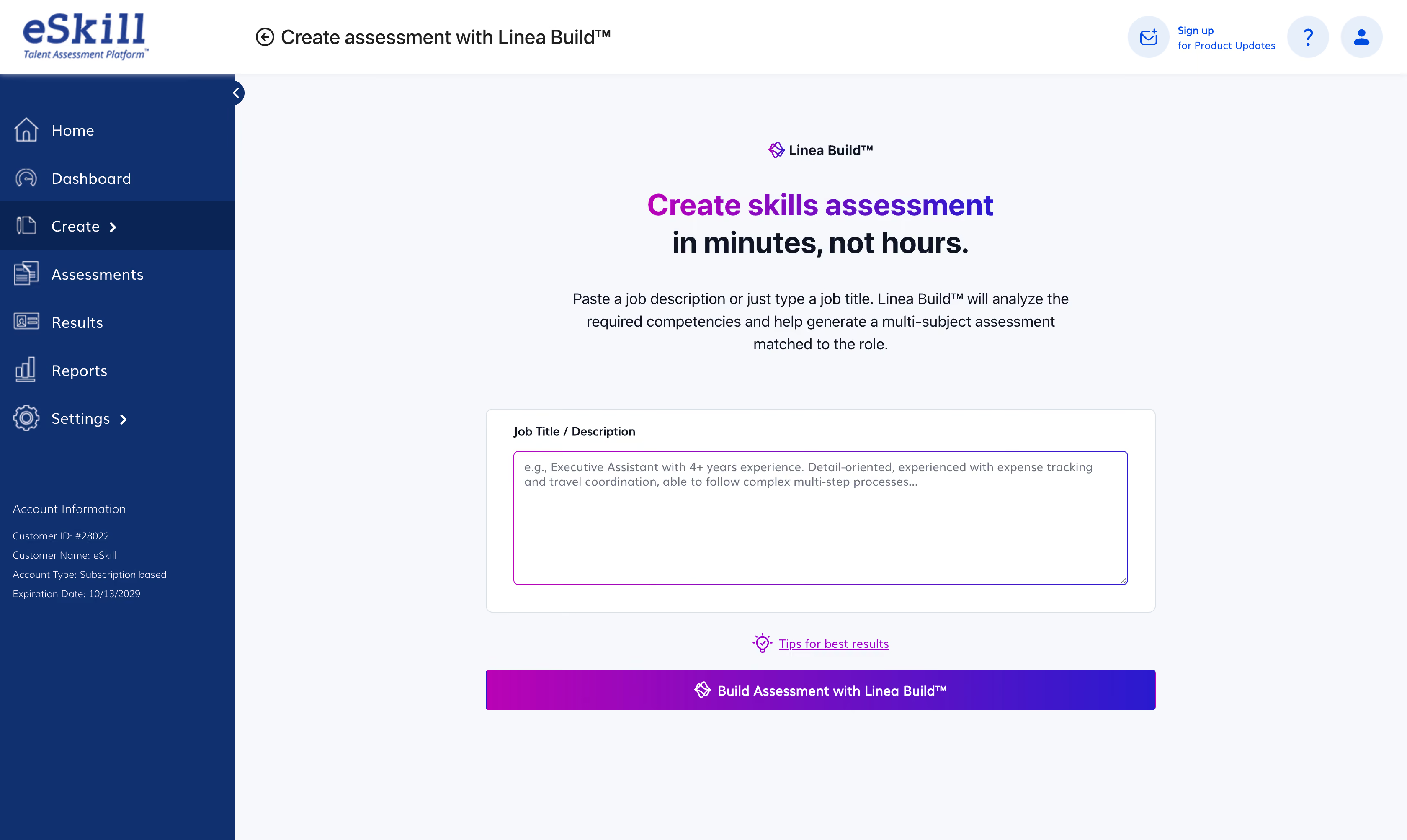
Build role-specific assessments in minutes, not hours. Linea Build uses Linea AI™ to recommend the most relevant questions from our Content Library based on your job title or description.
Two flows for how you work: Enter a job title and Linea AI™ guides you through structured steps (Seniority, Knowledge, Skills, Tools, Summary) to refine context. Or paste a full job description and the AI automatically pre-populates all fields, jumping straight to the Assessment Summary.
Select your assessment length (20, 30, or 40 questions), review and customize in the Assessment Editor, then save. You maintain full control — AI suggests, you decide. Re-run recommendations anytime via the "Discover Questions Using Linea AI™" button.
2 Other Improvements
Title
Description
Change link in email template
Updated candidate email templates to direct users to the Test Taker Resources page instead of the eSkill homepage, helping test takers access useful information such as FAQs and troubleshooting.. This change applies to both the Standard Email Template and Multiple Assessments Template.
Improve drag and drop UI in Behavioral Assessment creation
Enhanced the Traits and Interests drag-and-drop experience by making the drop zone and instructional guidance visible by default, improving discoverability before users begin dragging. Additionally, drag interactions were made more intuitive and bulk action buttons were aligned with their respective sections to create a clearer connection between actions and content.
3 Bug Fixes
Title
Description
Outlook Sim 2021: Font doesn't change
Resolved an issue in the simulation where changing the font of an email did not produce any visible change, making it unclear whether the action had been completed successfully. Font updates are now correctly reflected in the email content, providing clear feedback to test takers.
Broken layout on results page
Resolved a layout rendering issue that caused the UI to become misaligned after navigating to the Results and Assessments pages. The affected views now maintain proper structure and alignment across supported screen resolutions, ensuring a consistent user experience.
Broken layout in Quiz for free response with video
Resolved an intermittent layout issue affecting free response quiz questions with attached video content, where page elements could render incorrectly and disrupt the assessment experience. The question layout now displays consistently when video attachments are present, ensuring proper alignment of content and response areas.