Welcome to eSkill’s Test of the Month! In these posts, you’ll find information on popular eSkill assessments from our library of more than 600 subject types. This month, we’re spotlighting our Multitasking Simulation.
“Multitasking” may be a misnomer by certain standards (research insists our brains can’t truly multitask, and what “multitasking” refers to actually involves rapidly switching attention between multiple, separate contexts), but it conveys an important idea within hiring: can you balance competing priorities, manage interruptions, and capably concentrate attention on the most important tasks at hand?
Faced with multiple deadlines, can you navigate separate software platforms, send emails, and mentally organize communications while still maintaining an eagle-eyed attention to detail?
Can you manage your time? Can you effectively handle both phone calls and emails with the same client? Do you leave notes for yourself? Do you have a personal organization system? Can you synthesize information from multiple places?
These are all abilities colloquially grouped under the term “multitasking.”
Which jobs need multitasking abilities?
Multitasking is especially important for high-volume communication and coordination roles where success depends on quickly shifting between different tasks without losing accuracy.
An increasing number of roles must balance digital skills with customer service, writing ability, and offline notes.
Take healthcare office staff, for example — like medical receptionists and schedulers. These teams are responsible for managing patient inquiries, scheduling, and insurance processing.
Or receptionists, who are responsible for alternating between greeting clients, answering phones, handling emails, and organizing paperwork.
Customer service representatives, too, are tasked with assisting customers across phone, email, and chat while additionally documenting issues.
Administrative assistants in government positions handle emails, scheduling, document requests, and ad hoc support tasks throughout the day.
911 dispatchers answer emergency calls, relay information, and coordinate with responders — both through digital tools and over the phone.
And retail managers supervise staff, assist customers, manage inventory, and monitor sales — online and offline tasks that must be synthesized for the best outcomes.
What does the multitasking simulation cover?
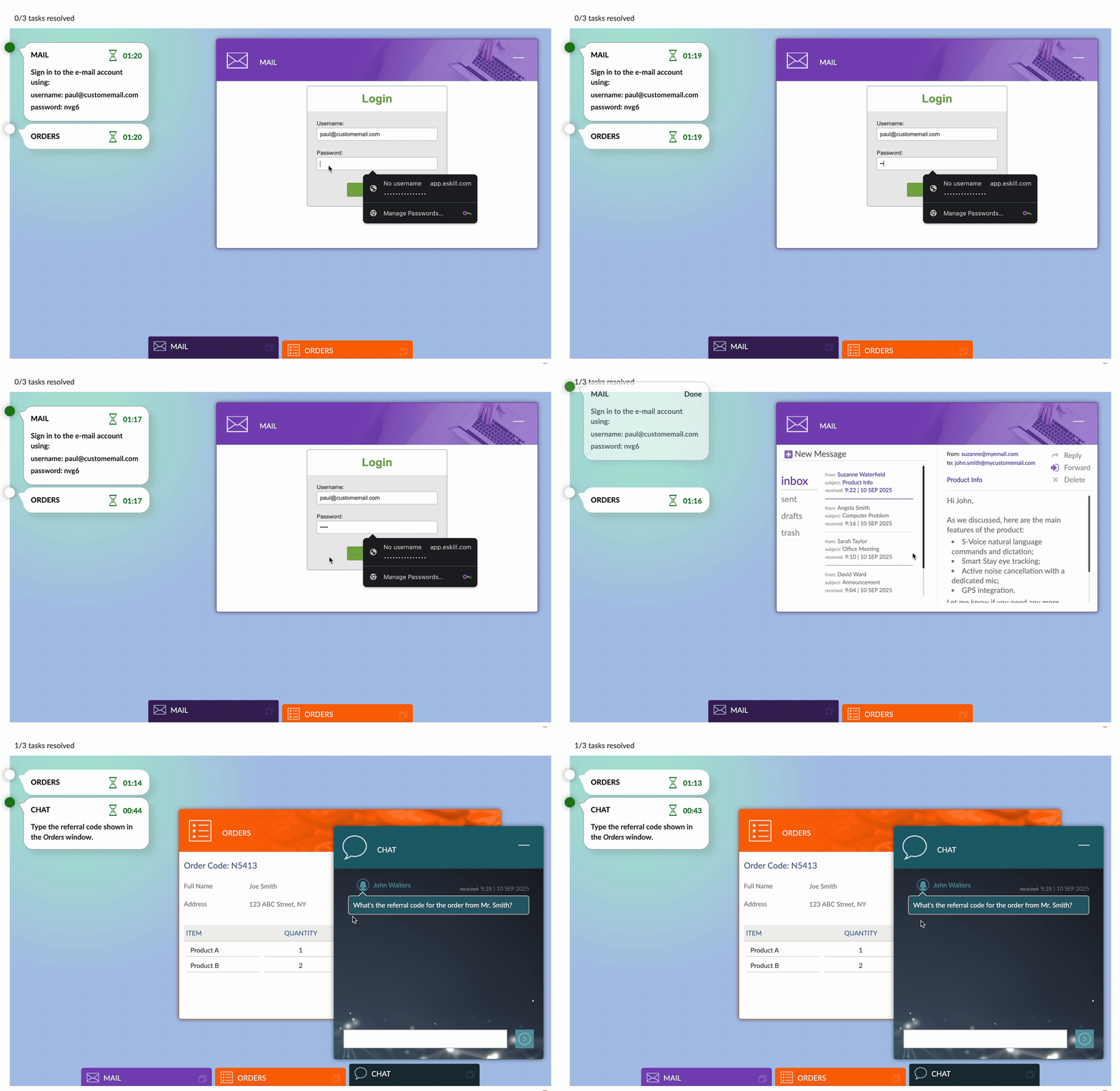
Our multitasking simulation is not a multiple choice or free-response test — it’s a true simulation, measuring how a candidate performs in the real context of digital platform usage and time-based constraints.
The candidate is required to perform different tasks, including managing e-mails, replying to chat messages, handling orders, and responding to customer requests within a time constraint.
The multitasking simulation is a strong fit for roles where employees are expected to juggle multiple streams of communication and tasks at once, often in fast-paced environments.
Since the test measures handling emails, chat, orders, and customer requests, it best aligns with jobs that require high task-switching, responsiveness, and organizational skills.
Test format
The ten-question test is based entirely on simulation exercises in which the candidate must type and send emails, change order information, and more. The simulations additionally test data entry (needing to accurately type in names and email addresses, for example), and can be paired with other job knowledge questions, one-way video questions, free-response answers, and additional simulations.
Complementary questions
Consider testing for digital literacy, role-specific job knowledge, and cognitive ability — and even adding role-specific knowledge questions. The following tests may serve as a good jumping-off point:
Attention to Detail — a multiple-choice assessment that covers several topics, including finding errors, word analysis, pictures, and word meaning.
Chat Simulation – a simulation in which the candidate is required to handle a series of chat messages and perform different tasks, including answering e-mails, handling orders, and responding to customer requests.
Business Communication – a test that measures a candidate’s knowledge of writing skills, business meetings, listening skills, and communication in the workplace.
Typing test – especially relevant for chat-heavy or order-entry roles.
Customer service — This test covers several topics, including problem solving, adaptability, teamwork and collaboration, and communication skills.
Digital literacy simulation — This test measures the candidate’s ability to perform tasks on computers and in an online environment. The test covers several topics, including basic computer operations, email, internet, social media, and working with computers.
Why use eSkill’s multitasking simulation?
Hiring managers (and psychologists) know that multitasking isn’t just about doing more at once. It’s about doing the right things well, under pressure, and without letting important details slip through the cracks.
That’s where eSkill’s multitasking simulation stands out. Unlike traditional multiple-choice tests, this simulation places candidates in a realistic, task-heavy environment where they must prioritize, communicate, and stay organized in real time.
The result is a clear picture of how they can perform on the job, not just what they know in theory.
From healthcare offices to customer service centers, retail management to emergency dispatch, the ability to juggle multiple tasks accurately and professionally is critical in endless contexts. Find the candidates who can handle the pace, and handle it well.
Talk to sales to learn more about how the eSkill platform can help you hire.