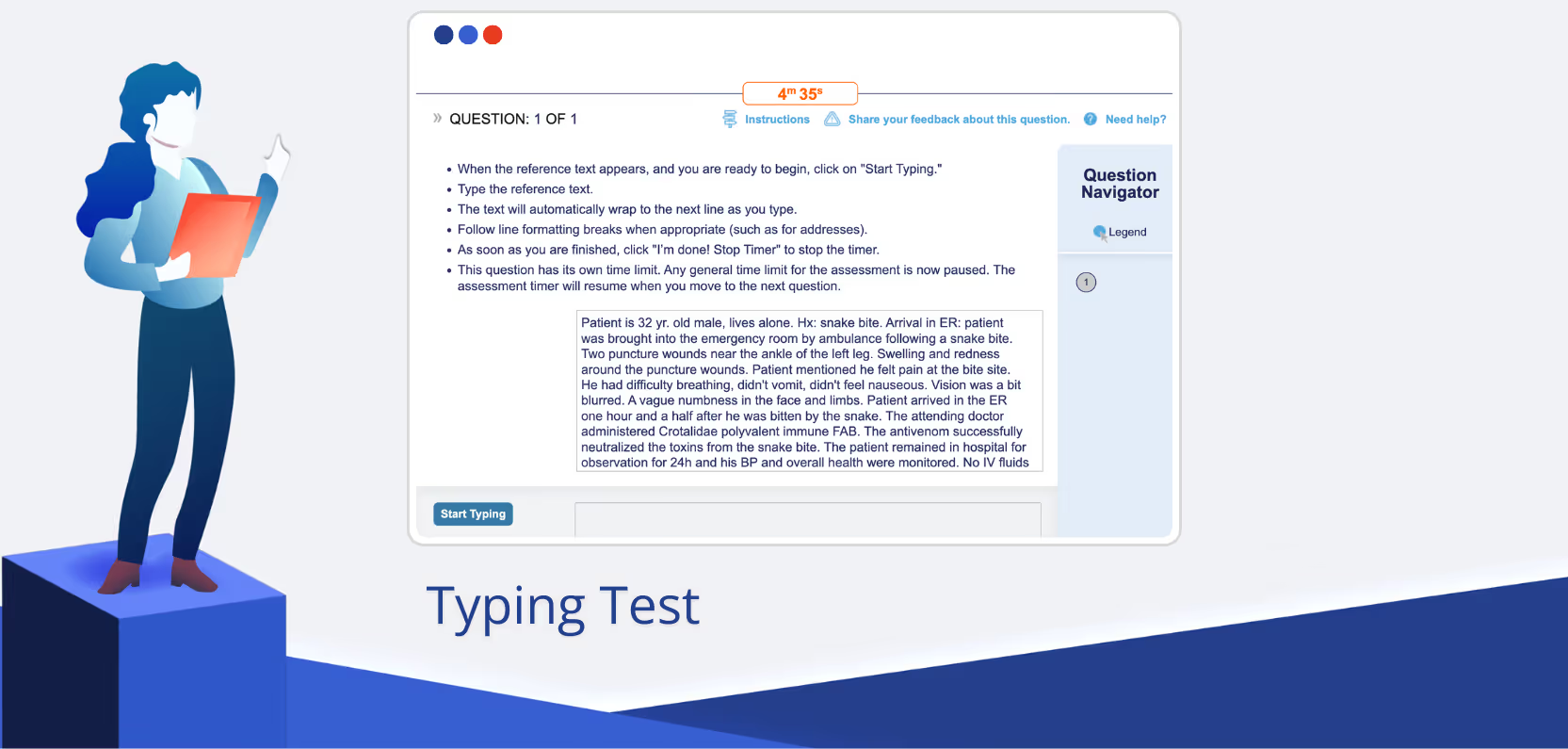
Welcome to eSkill’s Test of the Month! In these posts, you’ll find information on popular eSkill assessments from our library of more than 600 subject types. This month, we’re spotlighting our many typing exams.
One of the fastest typists in the world was Barbara Blackburn, a clerical worker who used the Dvorak keyboard layout (a layout different from, and faster than, QWERTY keyboards). She was featured in the Guinness Book of World Records in 1976 through ‘86 for her extreme typing speeds.
She could attain a speed of 170 wpm (words-per-minute), and even faster — citing a max of 212 wpm herself, though that speed was not officially recorded. She even appeared on a commercial for Apple and on a controversial episode of David Letterman.
These days, there are streamers, like MythicalRocket, who claim faster typing speeds — 300 wpm in one go. Typists like these often make their way to the top of MonkeyType leaderboards and the rosters of other online typing websites.
Stenographers — who use stenography machines and type in shorthand code — type even faster, over 300 wpm, due to the unique way steno machines operate. Stenographers often work for courts — where accuracy and understanding is key — or doing closed captioning for live broadcasts.
Have you tested your typing speed lately? Did you do it a minute ago when we mentioned MonkeyType? And how much does how fast you type matter for your success at your job?
What’s a good typing speed?
The average typing speed for most adults and office workers is 40 to 50 wpm. That might seem slow for your average millennial or Gen Z touch-typer, whose eyes boggle at the slomo hunt-and-peck cadence of their coworkers.
60-70 wpm is supposedly the speed “good for productivity” — a little faster than your average, and for most white collar workers whose jobs don’t revolve around how fast they can type (just that they can do so at a decent speed) — this cadence is fine, as long as it comes with accuracy.
Over 80 wpm is considered “advanced.” Professional typists or transcriptionists, on the other hand, can type at speeds of 80 to 120 WPM or higher — and even higher if they’re using stenography tools.
Does typing matter?
To put it briefly, with most work done on computers and across the internet, typing proficiently matters — point blank. But when it comes to testing for typing, whether or not it’s worth it to include typing on a pre-hire test depends on who you’re hiring for.
That said, the eSkill General Typing test is in the top ten most used tests on our platform. The Form-Fill Data Entry Typing test is in the top 25.
Our typing tests are not meant to help you find the next Barbara Blackburn, but they do help prove that candidates can reliably type at a speed fast enough for key clerical roles.
Typically, HR teams will test typing when they’re hiring for administrative assistants, executive assistants, office clerks, data entry specialists, receptionists, call center agents, secretaries, medical coders, dispatchers, and even virtual assistants.
Typing needs aren’t limited to one field — legal entities, medical organizations, the public sector — all need typing accuracy for different purposes.
Ideal industries & jobs
Certain roles — like court typists — must type quickly. Administration and data entry roles, too, benefit from fast typing speeds.
When it comes to the exclusive need for a typing skillset, the jobs are still around — even despite AI advancements. According to BLS data, “Despite limited employment growth, about 1,700 openings for court reporters and simultaneous captioners are projected each year, on average, over the decade.”
Here are some positions and departments that could use typing tests, beyond the roles where typing is the essential end-all be-all of the work at hand.
Administration & data entry
Speed expectation: 60–90 WPM
High-volume clerical and data-processing jobs require fast, consistent input. Speed boosts productivity and reduces backlogs, especially when handling repetitive forms or spreadsheets.
Fast typing streamlines correspondence, scheduling, and documentation — especially in executive offices, law firms, or finance companies where every minute counts.
Common roles:
- Administrative Assistant
- Data Entry Specialist
- Claims Processor
Customer Support & Chat Agents
Speed expectation: 50–90 WPM
Agents must handle multiple chat windows simultaneously and maintain professional tone and accuracy. Fast typing improves response time and customer satisfaction scores (CSAT).
Common roles:
- Live Chat Agent
- Technical Support Representative
- Virtual Assistant
Transcription & Closed Captioning
Speed expectation: 80–120+ WPM
Top tier: 150 WPM and up
Real-time transcriptionists (like court reporters or live captioners) must keep up with speech at around 200 words per minute. Captioners for TV, sports broadcasts, and livestreams must transcribe near-verbatim without falling behind. In court reporting, accuracy matters as much as speed — errors can have legal consequences.
Common roles:
- Court Reporter / Stenographer (often use stenotype machines)
- Medical / Legal Transcriptionist
- Real-Time Captioner
- Medical Transcriptionist / Editor
Medical Transcriptionists
Speed expectation: 60-80 WPM
Medical transcriptionists convert dictations from doctors into accurate reports, often using specialized medical terminology. Speed and accuracy directly affect pay, especially for per-line or per-minute contracts.
Granted, most office jobs need some ease with typing. These are just at the top of that list.
Talk to sales to learn more about how the eSkill platform can help you hire.
What do the typing exams cover?
Beyond general typing tests, eSkill offers specific typing prompts for a number of industries.
Our specialized typing assessments reflect the demands and lingo of different industries and job situations — including legal typing, data entry, and typing for call centers.
We also offer audio typing, where candidates listen to audio recordings and type what they hear, or where they type passages word-for-word.
Contact Data entry
The contact data entry exam involves typing emails, phone numbers, addresses, and other contact information into a form. Candidates will enter each piece of data on its own line, ensuring accuracy, proper spelling, and correct formatting.
Legal typing
The legal typing assessment measures a candidate’s ability to accurately transcribe complex legal language. During this test, they will be asked to copy a passage containing formal legal terminology, dense sentence structures, and industry-specific jargon.
The goal is to evaluate both speed and precision, since even a small typo can significantly alter the meaning of a legal document. Strong attention to detail, proper punctuation, and consistent formatting are key components of a successful score on this assessment.
Call Center typing
The call center typing test measures candidates’ ability to listen, process information quickly, and type in real time. In this assessment, they will hear a recorded customer service interaction or scripted call and transcribe it as accurately as possible.
This test evaluates typing speed, ability to follow dialogue, and attention to detail — all essential skills in fast-paced call center environments where accuracy and clarity directly impact customer satisfaction.
Financial typing
The financial typing assessment evaluates how well candidates can transcribe specialized financial language with speed and precision.
They will be asked to copy a passage that includes industry-specific terms, numerical data, and formal financial phrasing. Because even a minor error can affect reports, budgets, or audits, this test emphasizes accuracy, consistency, and strong attention to detail when working with sensitive financial content.
Medical typing
The medical typing test measures a candidate’s ability to accurately transcribe terminology used in clinical or healthcare environments. They will be asked to copy a passage containing medical jargon, anatomical terms, and complex phrasing commonly found in charts, notes, and reports.
10-key data entry
Numeric (10-key) entry measures how quickly and accurately someone can use the number keypad on a standard keyboard. It’s commonly used for jobs that involve entering lots of numbers — like payments, bills, invoices, or check information. Speed is usually measured in keystrokes per hour (KPH), and many employers look for a minimum of around 8,000 to 10,000 KPH.
Test formats
eSkill typing tests fall into a few categories — audio-based testing, which requires candidates to listen to a spoken passage and transcribe it word-for-word, written-based testing, and additionally, advanced and expert levels for certain tests, where audio may be sped up to assess accuracy under time-contrained conditions.
Audio
The audio typing test evaluates a candidate’s ability to accurately transcribe spoken content. It measures listening comprehension, spelling, punctuation, and attention to detail, ensuring that candidates can turn speech into clear, error-free text under time constraints.
Advanced/Expert levels
At higher difficulty levels, the passages are faster and more complex, requiring quick processing and exceptional accuracy.
These advanced audio tests are ideal for organizations that need to assess candidates for typing-intensive roles — such as transcriptionists, court reporters, or legal and medical support staff — where speed and precision are critical.
Complementary questions
Consider pairing typing speed tests with questions relevant to the role and industry you’re hiring for. That could mean not only testing that they can type quickly — but what they’re actually typing, too.
This could mean questions testing aptitude, business professionalism, call center simulations, medical knowledge and coding, or legal terminology knowledge.
Call center test
Candidates are assessed on their understanding of call center operations, with coverage that includes outbound calling, customer interaction, communication skills, and proper call-handling techniques throughout the customer journey.
Legal Terminology
Designed to gauge familiarity with US legal language and concepts, this test spans key areas such as ethics, employment law, securities, and criminal law.
Business Communication
Strong business etiquette and communication skills are the focus here, with topics ranging from professional vocabulary and meeting etiquette to cultural awareness, nonverbal communication, polished presentation, and workplace professionalism.
Chat Simulation
In this simulation, candidates must juggle multiple chat conversations at once while completing tasks such as processing orders, responding to emails, and assisting customers — demonstrating clarity, accuracy, and multitasking ability.
Data Checking
Attention to detail is put to the test as candidates review and compare information, spot errors, identify relevant details, and verify letters and numbers with speed and accuracy.
Why use typing exams?
Many employers assume a competent typing speed in their hires, especially when hiring for office workers.
But in some fields, that’s a given you can’t confirm. With digital literacy rates surprisingly low, it’s better to test for typing in tech-intensive fields, especially when data entry is extremely important.
Sure, you can make your hire go to MonkeyType and type out a few words. But do they have the accuracy and familiarity with your industry’s jargon? With how addresses are formatted for data entry positions?
Whether you’re going the aptitude or skills-based route, familiarity matters. Context matters. Typing is not an independent skill, separate from everything else.
Maybe your candidates (and you) can’t type as fast as MythicalRocket — but success in a role isn’t tied (entirely) to how quick someone types in a vacuum.
That’s why eSkill offers customizable testing solutions — so you can test for typing (specific to your industry) — alongside other knowledge, software, or aptitude requirements for a role.