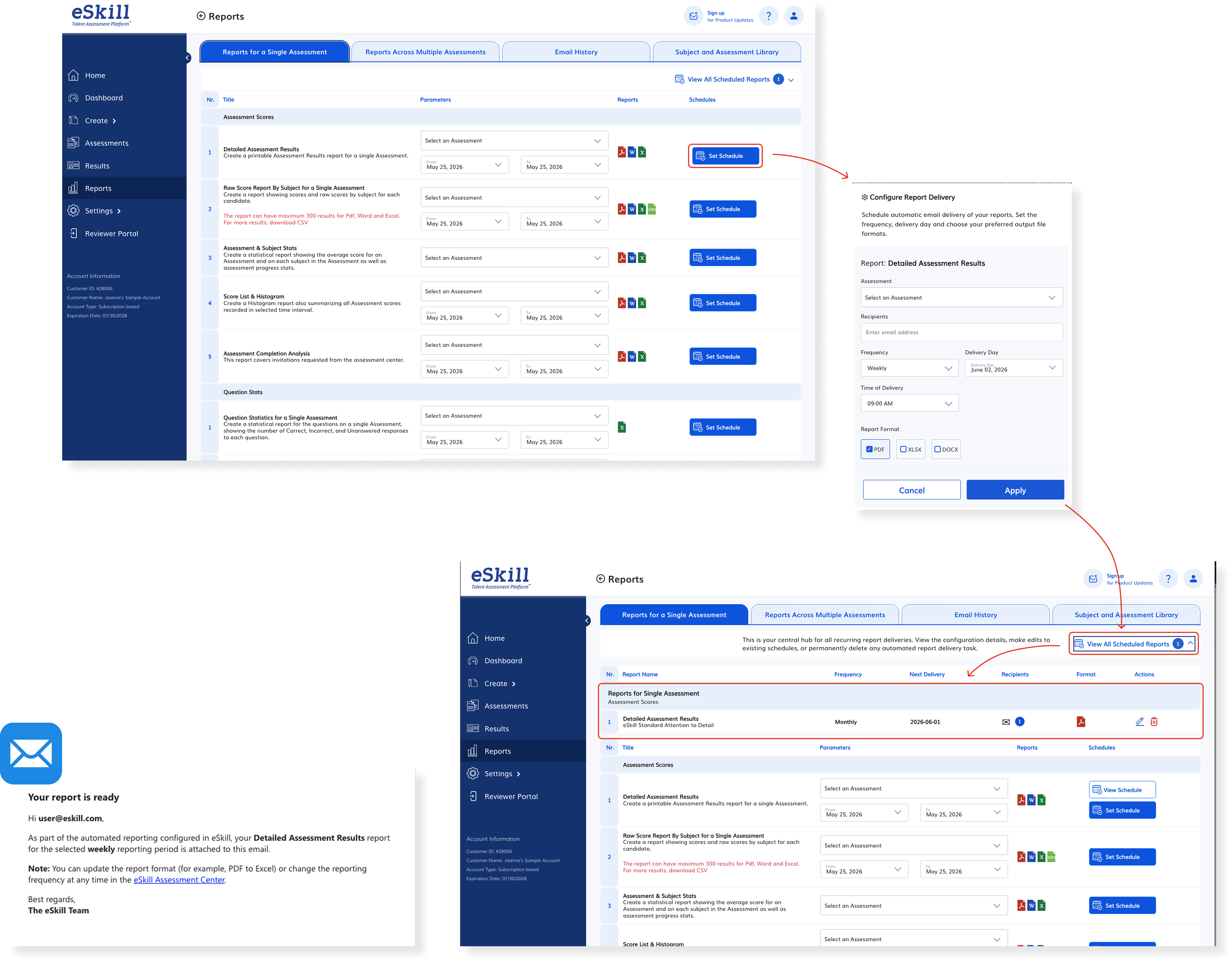
This project introduces an automated Report Scheduling system in the Test Center to eliminate manual report generation and ensure clients always have timely, up-to-date data for decision-making. Users will be able to configure recurring reports (including scope, format, recipients, and frequency) and manage all schedules from a centralized dashboard. The solution reduces operational overhead while meeting customer needs for reliable, automated compliance and performance tracking.
1.2 Accessibility Improvements (Part 2)
We’ve introduced additional accessibility improvements to the Quiz and Behavioral Assessment interfaces to help create a more inclusive experience for candidates. This release focuses on enhancing usability and support for text-based assessment interactions, based on internal accessibility reviews and automated testing.
Please note that these updates are part of an ongoing accessibility initiative, and some areas of the platform may continue to evolve in future releases.
2 Bug fixes
Title
Description
Fix logo filename disrupting client account
Resolved an issue where unsupported characters in uploaded logo filenames (e.g. apostrophes) could disable most client account features by adding filename validation during upload.
Proctoring Behavior - General URLS
Resolved an issue where assessment results from non-integrated general invitation links were incorrectly flagged as proctored by ensuring AntiCheat is only applied to invitations generated through properly configured workflows with unique identifiers.
Problem with viewing answers 2 lines long
Resolved an issue where checkbox alignment became inconsistent for multi-line answer options, causing the checkbox to appear vertically misaligned with the associated text.
Selection Tool Alignment Issue – Assessment UI
Resolved an issue where selection tools became misaligned with answer text during assessment delivery due to question formatting inconsistencies affecting answer line anchoring.
Support Icons Obstructed – Assessment UI
Resolved an issue where support tool icons in the assessment experience were partially obstructed by overlapping white space, causing visibility and usability issues for candidates.